
Give every job a clear stage, from enquiry through quoted, accepted, booked and in progress to complete and paid, and keep it in one place rather than spread across texts, notebooks and spreadsheets.
Then do three things every week: follow up on quotes you haven't heard back on, book in jobs that have been accepted, and chase unpaid invoices.
Most tilers are good at the tiling and struggle with everything else. Enquiries come in by text, WhatsApp, Facebook and phone. Quotes get written in the evening. Dates get pencilled in a diary, and invoices get sent whenever there's time. When work is quiet you can keep it all in your head. When it's busy, things get missed.
Give every job a stage
| Stage | What needs to happen |
|---|---|
| Enquiry | Reply quickly, get photos and rough sizes, book a visit if needed |
| Measured | Room sizes, tile choice, prep needed, photos of the job |
| Quoted | Quote sent. Follow up if you haven't heard back after a few days. |
| Accepted | Agree a start date, take a deposit if you use them, order materials |
| Booked / in progress | Confirm the start date with the customer and keep them updated |
| Complete | Invoice the same day. Ask for a review a few days later. |
| Paid | Record the payment. Add photos to your portfolio. |
Knowing the stage of every job tells you what to do next. The jobs that cost you money are the ones stuck in the middle: quotes nobody chased, accepted jobs never booked, finished jobs never invoiced.
Keep customer details in one place
For each customer keep the name, address, phone, email, what was quoted and any agreed changes. Customers often come back, or recommend you, years later, and it helps to know exactly which tiles and grout you used. Store their details securely. Under UK GDPR you're responsible for the customer data you hold.
A weekly 20-minute routine
- Chase quotes sent more than a few days ago with no reply. A short, polite message wins a surprising number of jobs.
- Book in accepted jobs that don't have a start date yet.
- Check next week's diary: materials ordered, customers told when you're arriving.
- Chase overdue invoices.
- Add finished work to your portfolio while the photos are on your phone.
Paper, spreadsheet or app?
| Good for | Falls down when | |
|---|---|---|
| Notebook and diary | Very few jobs, no learning curve | You need to find an old quote, or you lose the book |
| Spreadsheet | Cheap, flexible | On site, on a phone, and quotes and invoices are separate documents |
| Job management app | Quotes, jobs, calendar and invoices linked together, on your phone | It doesn't suit how you work. Try before you pay. |
How TileIQ handles it
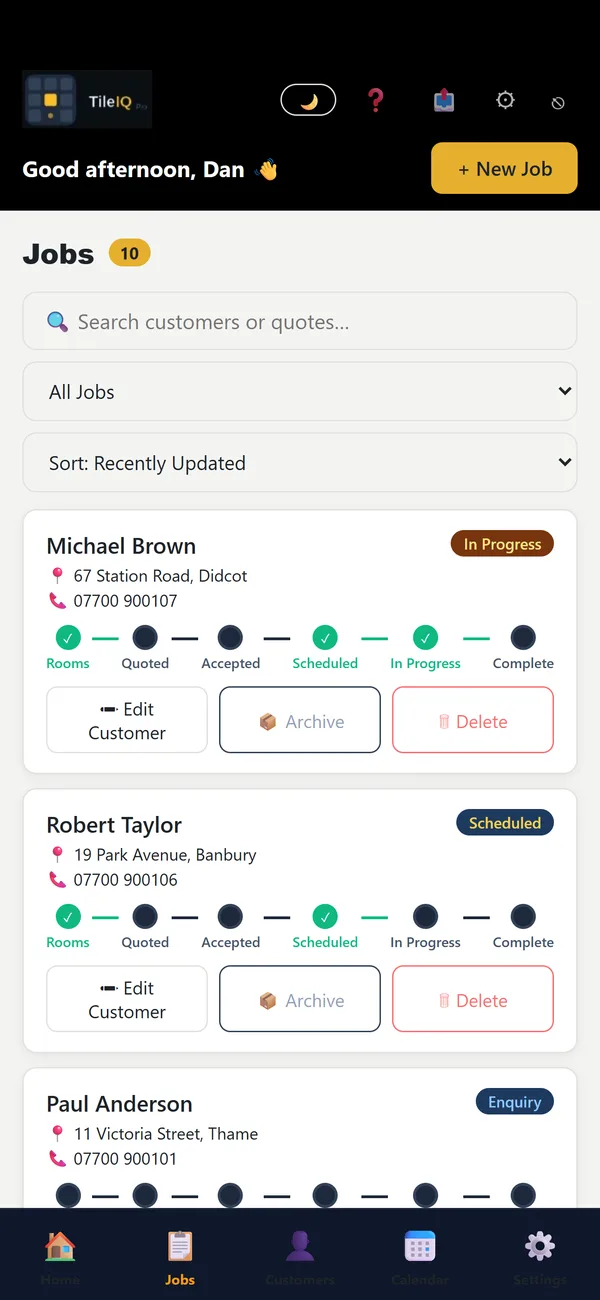
TileIQ was built for tilers. Each job moves from rooms and quote through to accepted, scheduled, in progress and complete:
- customers can accept quotes online;
- the app reminds you which quotes need following up and which accepted jobs still need booking in;
- finished jobs can trigger a Google review request a few days later.
Sources
- ICO: Guide to UK GDPR for small businesses · keeping customer details secure
Prices change. Figures were checked on 20 October 2026; always check current costs and your own figures before quoting.